Difficulty
Moderate
Steps
3
Time Required
- OpenEVSE WiFi (Beta) 3 steps

In Progress
This guide is currently being written. Reload periodically to see the latest changes.

Private
This guide will not appear in search results and can only be viewed by team members!
Quiz
0
-
-
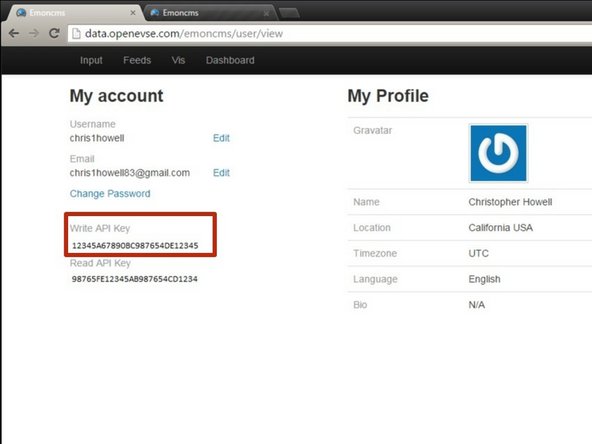
Setup Free account at: OpenEVSE Energy Monitoring
-
Enter Username, Email and Password to register for an Account.
-
On the account screen copy your Write API Key.
-
-
-
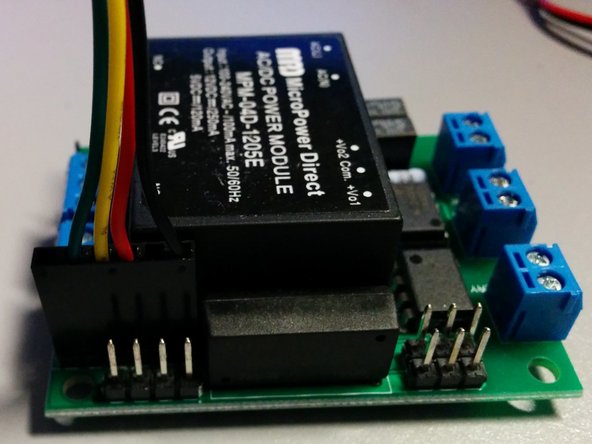
Connect the cable to the OpenEVSE Board and Wifi Module.
-
The header is the common FTDI format.
-
Pin 1 - Ground (Black)
-
Pin 3 - 5v (Red) - 75ma max Higher power devices must use external power.
-
Pin 4 - Recieve (Yellow) connects to transmit on the remote device.
-
Pin 5 - Transmit (Green) connects to receive on the remote device.
-
Because both boards use the same pin-out pin 5 and pin 5 must be crossed so transmit on one board connects to receive on the other.
-
Use alcohol pad to clean enclosure at the desired mount location. When dry remove the plastic on the high temp industrial double sided tape and attach WiFi module to enclosure.
-
-
-
WIth a phone or laptop connect to WiFi network.
-
SSID: OpenEVSE
-
Password: openevse
-
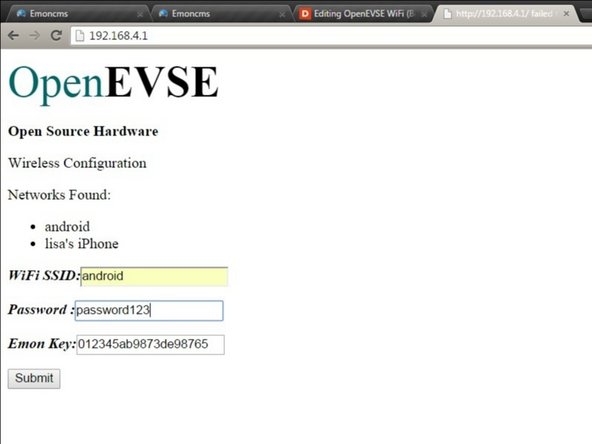
Once connected use a web browser to configure the WiFi Module:
-
Address: 192.168.4.1
-